
Windows11.1.0
x64
MSVC installer · EXE installer · 22.7 MB
Download EXE installerPineconeMC · formerly ElyPrismLauncher
Start with this ElyPrismLauncher download for Minecraft, choose the right PineconeMC platform build, and find practical help for accounts, skins, modpacks, OptiFine, shaders and common errors.
Current release 11.1.0 · Asset metadata checked 2026-09-15 · Links point to the official GitHub Release.
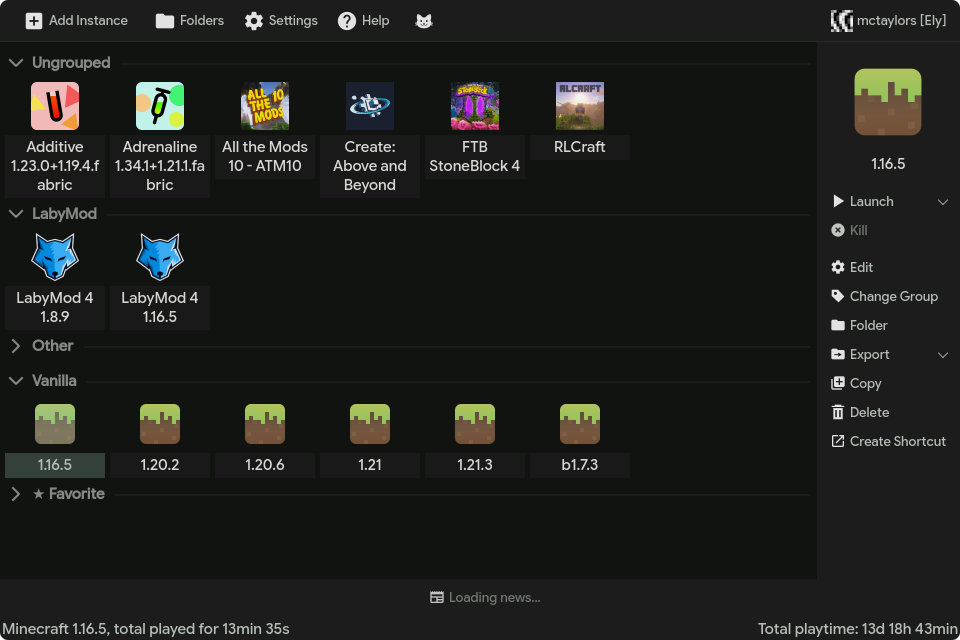
Choose your build
Use the installer for a normal setup. Choose a portable archive when you want to keep the launcher files in a folder you control.
MSVC installer · EXE installer · 22.7 MB
Download EXE installerMSVC installer · EXE installer · 20.9 MB
Download EXE installerDisk image · DMG · 42.6 MB
Download DMGAppImage · AppImage · 102.6 MB
Download AppImageNeed ARM64, portable, MinGW or Arch Linux files? The full download page lists the main installable and runnable builds from the current release. Source archives and update-helper files remain on the official release page.
A clearer download decision
An ElyPrismLauncher download should be matched to the current PineconeMC release, your operating system and your processor architecture. Start with the official asset shown above, then compare the filename and release tag on the source page. Windows x64 is common on Intel and AMD computers, while ARM64 is intended for compatible ARM hardware. macOS and Linux use their own package formats and permissions.
If an ElyPrismLauncher download opens a different website, adds an unrelated installer or promises a cracked account, stop and return to the official release source. A free launcher does not replace a Minecraft license or account provider. Keep the downloaded file until the first launch succeeds, but do not run a second repack just because the first file needs a normal security check.
After the ElyPrismLauncher download is installed, create one small vanilla instance and launch it before importing a large modpack. This baseline confirms that the data directory, Java runtime and account flow work. It also gives you a clean comparison when a loader, shader, OptiFine build or remote metadata service causes a later error. Use the focused guides below for the next task and keep worlds backed up before changing files.
Name change explained
Yes. PineconeMC is the current project name. Many players still search for “ElyPrismLauncher download”, so this site keeps both names visible to make the transition clear.
The launcher workflow remains focused on Minecraft instances, loaders, modpacks and account management. If a tutorial says ElyPrismLauncher and the current app says PineconeMC, you are usually looking at the same project lineage.
Read the project and site note →Download hygiene
Start with a task
These pages answer the next question after downloading the launcher.
Windows, macOS and Linux setup steps.
02Add an Ely.by accountUse the account flow without sharing your password.
03Change a Minecraft skinUpload, select and troubleshoot skin visibility.
04Install modpacksUse Modrinth, CurseForge or an imported file.
05Set up OptiFineMatch the Minecraft version and loader.
06Install shadersChoose a compatible Iris or OptiFine route.
When something breaks
Start with the symptom you see instead of reinstalling immediately.
What this site covers
PineconeMC is a Prism Launcher fork used to organize Minecraft instances, versions, loaders, mods and modpacks. The current project name is PineconeMC, but old guides and search results still use ElyPrismLauncher. This site connects those terms so you can find the right ElyPrismLauncher download, the right release and the right next step.
The homepage is intentionally download-first: choose a platform asset matched to the release metadata, check the release number, and continue to the full platform matrix when you need a less common build. The supporting guides then cover the tasks users commonly search for after installation, including adding an Ely.by account, changing skins, importing modpacks and configuring visual mods.
For problems, use the symptom-based troubleshooting pages. They explain what to check in order, where logs usually help, and when reinstalling is actually justified. A network error can be caused by metadata access, a blocked domain, a proxy, an incorrect system clock or a service outage; a missing Minecraft version is not automatically a broken installation.
A cleaner first launch
A reliable ElyPrismLauncher download is only the first part of a working setup. After PineconeMC opens, create a small vanilla instance with the Minecraft version you actually want to play. This gives you a simple baseline for checking Java, account authentication, game files and the launcher data directory.
Once that test instance starts, add a loader, performance mod or shader one change at a time. If a larger modpack later fails, you can compare it with the clean instance instead of guessing whether the download, Java runtime, loader or mod dependency caused the problem.
Know the boundary
PineconeMC organizes Minecraft instances and helps you select versions, loaders and mod files. It does not provide a Minecraft license, replace Microsoft or Ely.by account recovery, or make incompatible mods work together. A launcher can be installed correctly while a selected modpack, Java runtime or remote metadata service still needs attention.
Use the focused guides on this site to isolate one layer at a time. The goal is a traceable setup: a known release, a matching platform asset, a supported account flow and a test instance whose logs can explain the next failure.
Quick answers
PineconeMC is the current project name used by the launcher formerly known as ElyPrismLauncher. This site keeps both names visible because users still search for the old name.
Use this ElyPrismLauncher download page or the official release links on it, which point to the project Release assets. Check the filename and release tag before opening a file, and avoid random mirrors and repacked installers.
The current release includes Windows, macOS and Linux files. Choose the architecture and file type that match your device on the download page.
Yes. Follow the Ely.by account guide and complete authentication through the supported flow.
Check metadata access, the system clock, firewall or proxy settings, cached metadata and the launcher log. Use the version-list troubleshooting guide.